<?xml version="1.0" encoding="utf-8"?>
<feed xmlns="http://www.w3.org/2005/Atom">

  <title><![CDATA[Programming Workshop]]></title>
  <link href="http://workshop.theresnobox.net/atom.xml" rel="self"/>
  <link href="http://workshop.theresnobox.net/"/>
  <updated>2014-10-05T09:07:15-04:00</updated>
  <id>http://workshop.theresnobox.net/</id>
  <author>
    <name><![CDATA[Kristi Centinaro]]></name>
    
  </author>
  <generator uri="http://octopress.org/">Octopress</generator>

  
  <entry>
    <title type="html"><![CDATA[YouTube Player]]></title>
    <link href="http://workshop.theresnobox.net/blog/2014/10/05/youtube-player/"/>
    <updated>2014-10-05T08:32:21-04:00</updated>
    <id>http://workshop.theresnobox.net/blog/2014/10/05/youtube-player</id>
    <content type="html"><![CDATA[<p>In this exercise, you&rsquo;ll try to bring in Youtube video information using their JSON API. You may find <a href="http://gdisf-js-apis.appspot.com/">these slides</a> useful.</p>

<p>Start with <a href="http://www.teaching-materials.org/ajax/jsapis_solution.html">this file</a>.</p>

<ul>
<li>Go to the <a href="https://developers.google.com/youtube/2.0/developers_guide_jsonc">Youtube API docs</a> and read through them. Look at the sample output and the example URLs for the API. Find a URL that will give you search results, and test that out in the browser.</li>
<li>The webpage currently brings in video information using the jQuery <code>$.ajax</code> function to bring in a local <code>videos.json</code> file into the page.</li>
<li>Change that function so that it instead brings in the results of a Youtube API search from the Youtube servers and displays those results instead. Search for whatever you fancy, but limit the search to 5 results.</li>
<li><strong>Tips:</strong> Remember that the JSON that the Youtube API returns will be different than the JSON format of <code>videos.json</code>. You should <code>console.log</code> inside your callback to see what the data looks like and make sure you&rsquo;re using it correctly. In particular, check how they store the <code>ID</code>, the <code>author</code>, and the <code>rating</code>.</li>
<li><strong>Bonus:</strong> Create your own playlist on Youtube of your favorite videos, and bring that into the page instead.</li>
<li><strong>Bonus:</strong> Add a search button to the page so that people can search for any query.</li>
</ul>


<p>Make sure that you use your browser developer tools to make debugging easier while working on this. Check for errors, and use <code>console.log()</code> to figure out how far your code makes it, and what the values of your variables are along the way.</p>
]]></content>
  </entry>
  
  <entry>
    <title type="html"><![CDATA[Data Visualization]]></title>
    <link href="http://workshop.theresnobox.net/blog/2014/10/05/data-visualzation/"/>
    <updated>2014-10-05T08:23:35-04:00</updated>
    <id>http://workshop.theresnobox.net/blog/2014/10/05/data-visualzation</id>
    <content type="html"><![CDATA[<p>The point of this exercise is to learn to read, manipulate, and visualize data in JavaScript.</p>

<ul>
<li>Find an interesting dataset in some sort of text format (XML, JSON, CSV, etc).</li>
<li>Store the dataset in your project folder.</li>
<li>Truncate it to a reasonable length if it’s very long (i.e. 1000 rows). Some possible sources are:

<ul>
<li><a href="http://explore.data.gov">explore.data.gov</a></li>
<li><a href="http://usgovxml.com">usgovxml.com</a></li>
<li><a href="http://geocommons.com">geocommons.com</a></li>
</ul>
</li>
<li>Create an empty webpage and load the dataset into your webpage using an AJAX or JSONP request. (See slides: <a href="http://www.teaching-materials.org/ajax/">AJAX/JSONP</a>)</li>
<li>Display the data as a <code>table</code> with columns for each of the attributes. (See slides: <a href="http://www.teaching-materials.org/htmlcss-1day/lesson3/slides.html#slide3">HTML Tables</a>)</li>
<li>Use the <a href="http://tablesorter.com/docs/">tablesorter</a> jQuery plugin to make the table sortable. (See slides: <a href="http://www.teaching-materials.org/jquery/">jQuery</a>)</li>
<li>Create a <code>form</code> above the <code>table</code> which lets users filter or manipulate the data somehow, i.e. a dropdown box to only show rows matching a particular query, or a way of summing up attributes. Whatever would be useful with the data. (See slides: <a href="http://www.teaching-materials.org/javascript/slides/objectsdom.html">DOM</a>, <a href="http://www.teaching-materials.org/javascript/slides/animevents.html">Events</a>)</li>
<li>Use the <a href="http://www.highcharts.com/">High Charts JS library</a> to visualize a numerical aspect of the data. Or find <a href="http://selection.datavisualization.ch/">a different library here</a>.</li>
<li>If the data has a geographical aspect (locations), use the <a href="https://developers.google.com/maps/">Google Maps API</a> to plot it on a map. (See slides: <a href="http://gdisf-js-apis.appspot.com/">JS APIs</a>)</li>
<li>Use <a href="getbootstrap.com">Twitter Bootstrap</a> on the site to make it prettier, styling the buttons and table.</li>
</ul>

]]></content>
  </entry>
  
  <entry>
    <title type="html"><![CDATA[Memory Game]]></title>
    <link href="http://workshop.theresnobox.net/blog/2014/10/04/memory-game/"/>
    <updated>2014-10-04T16:44:32-04:00</updated>
    <id>http://workshop.theresnobox.net/blog/2014/10/04/memory-game</id>
    <content type="html"><![CDATA[<h1>The Memory Game</h1>

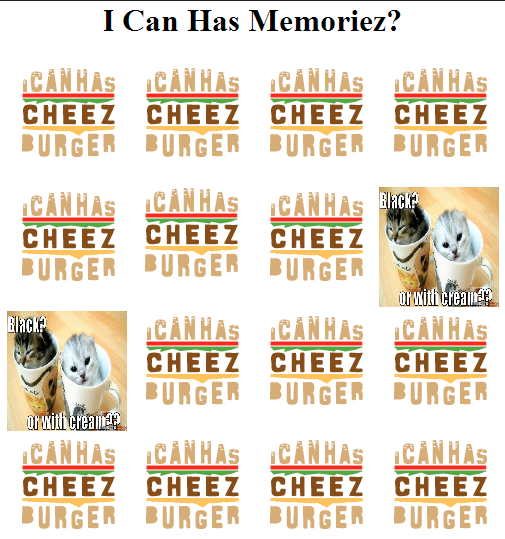
<p>In this exercise, you&rsquo;ll make a LOLCat memory game &ndash; you can see a screenshot of a sample solution on the right. A memory game consists of an even number of tiles with images on one side and a generic back. Each image appears on precisely two tiles. You start the game with all tiles turned face down, and proceed to flip over two tiles at a time. If the two tiles have the same image, they remain face up. If not, they&rsquo;re flipped face down again after a short delay. The goal of the game is to get all the tiles flipped face up (i.e., find all the matching image pairs) in the least number of tries.</p>

<p><img src="http://workshop.theresnobox.net/images/posts/beg_js/memory1.png"><br/>
<em>Example of what we&rsquo;re building.</em></p>

<p>We&rsquo;ll make the game more fun by using random LOLCat images from <a href="http://lolcat.com">http://lolcat.com</a> for the tiles. This site works particularly well for our purposes because their images follow a regular naming scheme so we can avoid scraping image URLs from sites by hand. The lolcat.com image URLs follow the pattern <code>http://lolcat.com/images/lolcats/NNNN.jpg</code>, where <code>NNNN</code> is a sequentially assigned number. Some experimentation shows that most of the range between <code>900</code> and <code>1250</code> works well, though a few of the images are missing. (If you happen to pick a missing one, it&rsquo;ll appear as a broken image as show in the example &ndash; don&rsquo;t worry about it, or just reload your page to pick another set.)</p>

<h2>Here are some suggested steps for building the game:</h2>

<p>Write the HTML for the game&rsquo;s page, displaying a grid of face-down tiles. You can use any image you want for the tiles&#8217; backs, but make sure it&rsquo;s not easily confused with the LOLCat pictures, so it&rsquo;s clear whether a tile is face up or face down.</p>

<p>You&rsquo;ll probably want to use a <code>&lt;table&gt;</code> to lay out the tiles, and set the width and height of each image by hand. You can either write the table by hand into your HTML file, or write code to generate it dynamically using <code>document.createElement</code> and <code>appendChild</code>.</p>

<p>Write code to pick a bunch of random LOLCat image URLs and stick two copies of each URL into an array, then randomize the order of the array (using the code from the previous exercise).</p>

<p>You might also take this opportunity to preload the images so there&rsquo;ll be no delay when they&rsquo;re flipped over for the first time. Make the preload images visible for now so you can verify that you&rsquo;re forming the URLs correctly.</p>

<p>Assign one LOLCat URL from the randomized array to each tile. The easiest way to attach the URLs is to store them in a made-up attribute (e.g. facesrc) right on the DOM image elements.</p>

<p>The browser will ignore any attributes it doesn&rsquo;t understand, but you&rsquo;ll be able to retrieve them later in your code when handling click events on the elements. (Note though that Firebug will not show your custom attribute in the DOM pane.)</p>

<p>Attach a <code>click</code> handler to each tile that will turn it face up. Make sure that clicking on tiles that are already face up does nothing.</p>

<p>Add a <code>timeout</code> handler when a tile is turned face up that will flip the tile face down again after a short delay (e.g., 500 milliseconds).
Add the game logic that keeps track of the tiles that are face up and reacts appropriately based on whether they match or not.</p>

<p>You should now have a working game! Have fun playing it and tweaking it to really make it your own.</p>

<p><strong>Here&rsquo;s a few suggestions for extra features you could add:</strong>
  - Add an outline around &ldquo;active&rdquo; tiles (flipped up but not yet matched) so it&rsquo;s clear which tile the player is currently trying to match.
  Add a timer or move counter to make the game more competitive. (For the timer, window.setInterval() could prove useful.)
  - When the game is over, allow the player to see the full-size LOLCat pictures from the tiles.
  - Allow the player to start a new game with a button, rather than by reloading the page. You could also allow them to pick the size of the board to play on.
  - Manually make a list of &ldquo;bad&rdquo; image numbers in the code to avoid picking them, or find a different source of pictures to play with.</p>
]]></content>
  </entry>
  
  <entry>
    <title type="html"><![CDATA[Word Guesser]]></title>
    <link href="http://workshop.theresnobox.net/blog/2014/10/04/word-guesser/"/>
    <updated>2014-10-04T16:39:20-04:00</updated>
    <id>http://workshop.theresnobox.net/blog/2014/10/04/word-guesser</id>
    <content type="html"><![CDATA[<h1>The Word Guesser</h1>

<p>You&rsquo;ll create a simple word guessing game where the user gets infinite tries to guess the word (like Hangman without the hangman, or like Wheel of Fortune without the wheel and fortune).</p>

<ul>
<li>Create two global arrays: one to hold the letters of the word (e.g. <code>'F', 'O', 'X'</code>), and one to hold the current guessed letters (e.g. it would start with <code>'_', '_', '_'</code> and end with <code>'F', 'O', 'X'</code>).</li>
<li>Write a function called <code>guessLetter</code> that will:

<ul>
<li>Take one argument, the guessed letter.</li>
<li>Iterate through the word letters and see if the guessed letter is in there.</li>
<li>If the guessed letter matches a word letter, changed the guessed letters array to reflect that.</li>
<li>When it&rsquo;s done iterating, it should log the current guessed letters (<code>'F__'</code>) and congratulate the user if they found a new letter.</li>
<li>It should also figure out if there are any more letters that need to be guessed, and if not, it should congratulate the user for winning the game.</li>
</ul>
</li>
<li>Pretend you don&rsquo;t know the word, and call <code>guessLetter</code> multiple times with various letters to check that your program works.</li>
</ul>


<p><strong>Bonus:</strong> Make it more like Wheel of Fortune:
- Start with a reward amount of $0
- Every time a letter is guessed, generate a random amount and reward the user if they found a letter (multiplying the reward if multiple letters found), otherwise subtract from their reward.
- When they guess the word, log their final reward amount.</p>

<p><strong>Bonus:</strong> Make it like Hangman:
- Keep track of all the guessed letters (right and wrong) and only let the user guess a letter once. If they guess a letter twice, do nothing.
- Keep track of the state of the hangman as a number (starting at 0), and subtract or add to that number every time they make a wrong guess.
Once the number reaches 6 (a reasonable number of body parts for a hangman), inform the user that they lost and show a hangman on the log.</p>

<h3><a href="http://workshop.theresnobox.net/files/beg_js/wordguess_solution.js">See Solution</a></h3>
]]></content>
  </entry>
  
  <entry>
    <title type="html"><![CDATA[Cat Walk]]></title>
    <link href="http://workshop.theresnobox.net/blog/2014/10/04/cat-walk/"/>
    <updated>2014-10-04T16:35:29-04:00</updated>
    <id>http://workshop.theresnobox.net/blog/2014/10/04/cat-walk</id>
    <content type="html"><![CDATA[<h1>Cat Walk</h1>

<p>The goal of this exercise to make an awesome interactive animated cat.</p>

<p>You may find <a href="http://www.teaching-materials.org/javascript/slides/animevents.html">these slides</a> helpful.</p>

<p>Start with this webpage, which has an img of a cat walking, and JavaScript functions that animate the cat across the screen. (For all of these, you shouldn&rsquo;t need to touch the original code - just add code below.)</p>

<figure class='code'><div class="highlight"><table><tr><td class="gutter"><pre class="line-numbers"><span class='line-number'>1</span>
<span class='line-number'>2</span>
<span class='line-number'>3</span>
<span class='line-number'>4</span>
<span class='line-number'>5</span>
<span class='line-number'>6</span>
<span class='line-number'>7</span>
<span class='line-number'>8</span>
<span class='line-number'>9</span>
<span class='line-number'>10</span>
<span class='line-number'>11</span>
<span class='line-number'>12</span>
<span class='line-number'>13</span>
<span class='line-number'>14</span>
<span class='line-number'>15</span>
<span class='line-number'>16</span>
<span class='line-number'>17</span>
<span class='line-number'>18</span>
<span class='line-number'>19</span>
<span class='line-number'>20</span>
<span class='line-number'>21</span>
<span class='line-number'>22</span>
<span class='line-number'>23</span>
<span class='line-number'>24</span>
<span class='line-number'>25</span>
<span class='line-number'>26</span>
<span class='line-number'>27</span>
<span class='line-number'>28</span>
<span class='line-number'>29</span>
<span class='line-number'>30</span>
<span class='line-number'>31</span>
<span class='line-number'>32</span>
<span class='line-number'>33</span>
<span class='line-number'>34</span>
</pre></td><td class='code'><pre><code class=''><span class='line'>&lt;!DOCTYPE html>
</span><span class='line'>  &lt;html>
</span><span class='line'>   &lt;head>
</span><span class='line'>    &lt;meta charset="utf-8" />
</span><span class='line'>    &lt;title>Cat Walk&lt;/title>
</span><span class='line'>   &lt;/head>
</span><span class='line'>   &lt;body>
</span><span class='line'>    
</span><span class='line'>    &lt;button id="start-button">Start&lt;/button>
</span><span class='line'>    &lt;button id="speed-button">Go Faster!&lt;/button>
</span><span class='line'>    &lt;button id="stop-button">Stop&lt;/button>
</span><span class='line'>    &lt;div id="info">&lt;/div>
</span><span class='line'>    
</span><span class='line'>    &lt;img style="position:absolute; left: 0px; top: 80px;" src="http://www.anniemation.com/clip_art/images/cat-walk.gif">
</span><span class='line'>
</span><span class='line'>    &lt;script>
</span><span class='line'>      var movePixels = 10;
</span><span class='line'>      var delayMs = 50;
</span><span class='line'>      var catTimer = null;
</span><span class='line'>      function catWalk() {
</span><span class='line'>        var img = document.getElementsByTagName('img')[0];
</span><span class='line'>        var currentLeft = parseInt(img.style.left);
</span><span class='line'>        img.style.left = (currentLeft + movePixels) + 'px';
</span><span class='line'>        if (currentLeft > (window.innerWidth-img.width)) {
</span><span class='line'>          img.style.left = '0px';
</span><span class='line'>        }
</span><span class='line'>      }
</span><span class='line'>      function startCatWalk() {
</span><span class='line'>        catTimer = window.setInterval(catWalk, delayMs);
</span><span class='line'>      }
</span><span class='line'>    &lt;/script>
</span><span class='line'>
</span><span class='line'>   &lt;/body>
</span><span class='line'>  &lt;/html></span></code></pre></td></tr></table></div></figure>


<ul>
<li>Add an event listener to the start button, so that the cat starts moving across the screen when its clicked.</li>
<li>Add an event listener to the stop button, so that the cat stops moving when clicked.</li>
<li>Add an event listener to the speed button, so that the cat moves faster when it&rsquo;s clicked.</li>
<li><strong>Bonus:</strong> Disable the start/stop/faster buttons at the appropriate times (e.g. the user shouldn&rsquo;t be able to click &ldquo;stop&rdquo; if the cat isn&rsquo;t currently moving.)</li>
</ul>


<h3><a href="http://workshop.theresnobox.net/files/beg_js/catwalk_solution.js">See Solutions</a></h3>
]]></content>
  </entry>
  
  <entry>
    <title type="html"><![CDATA[Mad Libs]]></title>
    <link href="http://workshop.theresnobox.net/blog/2014/10/04/mad-libs/"/>
    <updated>2014-10-04T16:29:44-04:00</updated>
    <id>http://workshop.theresnobox.net/blog/2014/10/04/mad-libs</id>
    <content type="html"><![CDATA[<p>The goal of this exercise is to make a Mad Libs generator.</p>

<p>The second half of <a href="http://www.teaching-materials.org/javascript/slides/animevents.html">these slides</a> may be useful.</p>

<p>Start with this webpage, which has several input elements and a button:</p>

<figure class='code'><div class="highlight"><table><tr><td class="gutter"><pre class="line-numbers"><span class='line-number'>1</span>
<span class='line-number'>2</span>
<span class='line-number'>3</span>
<span class='line-number'>4</span>
<span class='line-number'>5</span>
<span class='line-number'>6</span>
<span class='line-number'>7</span>
<span class='line-number'>8</span>
<span class='line-number'>9</span>
<span class='line-number'>10</span>
<span class='line-number'>11</span>
<span class='line-number'>12</span>
<span class='line-number'>13</span>
<span class='line-number'>14</span>
<span class='line-number'>15</span>
<span class='line-number'>16</span>
<span class='line-number'>17</span>
</pre></td><td class='code'><pre><code class=''><span class='line'>&lt;!DOCTYPE html>
</span><span class='line'>  &lt;html>
</span><span class='line'>  &lt;head>
</span><span class='line'>    &lt;meta charset="utf-8" />
</span><span class='line'>    &lt;title>&lt;/title>
</span><span class='line'>  &lt;/head>
</span><span class='line'>  &lt;body>
</span><span class='line'>    &lt;h1>Mad Libs&lt;/h1>
</span><span class='line'>    &lt;ul>
</span><span class='line'>      &lt;li>Noun: &lt;input type="text" id="noun">
</span><span class='line'>      &lt;li>Adjective: &lt;input type="text" id="adjective">
</span><span class='line'>      &lt;li>Someone's Name: &lt;input type="text" id="name">
</span><span class='line'>    &lt;/ul>
</span><span class='line'>    &lt;button id="lib-button">Lib it!&lt;/button>
</span><span class='line'>    &lt;div id="story">&lt;/div>
</span><span class='line'>  &lt;/body>
</span><span class='line'>  &lt;/html></span></code></pre></td></tr></table></div></figure>


<p></p>

<ul>
<li>Add a script tag to the bottom of the page for your code.</li>
<li>Add an event listener to the button so that it calls a <code>makeMadLib</code> function when clicked.</li>
<li>In the <code>makeMadLib</code> function, retrieve the current values of the form input elements, make a story from them, and output that in the story div (like &ldquo;Pamela really likes pink cucumbers.&rdquo;)</li>
</ul>


<h3><a href="http://workshop.theresnobox.net/files/beg_js/madlibs_solution.js">Show Solution</a></h3>
]]></content>
  </entry>
  
  <entry>
    <title type="html"><![CDATA[Calculator]]></title>
    <link href="http://workshop.theresnobox.net/blog/2014/10/04/calculator/"/>
    <updated>2014-10-04T16:21:42-04:00</updated>
    <id>http://workshop.theresnobox.net/blog/2014/10/04/calculator</id>
    <content type="html"><![CDATA[<h2>The Calculator</h2>

<p>You can use something like <a href="http://repl.it">repl.it</a> to code this so that you don&rsquo;t need to worry about making a webpage, or you can create a whole webpage for it, with inputs and buttons. You may want to start off with just JS and then add the UI later, but it&rsquo;s up to you.</p>

<p>You may find <a href="http://www.teaching-materials.org/javascript/slides/varsfunctions.html">these slides</a> useful.</p>

<ul>
<li>Write a function called <code>squareNumber</code> that will take one argument (a number), square that number, and return the result. It should also log a string like <code>"The result of squaring the number 3 is 9."</code></li>
<li>Write a function called <code>halfNumber</code> that will take one argument (a number), divide it by 2, and return the result. It should also log a string like <code>"Half of 5 is 2.5."</code></li>
<li>Write a function called <code>percentOf</code> that will take two numbers, figure out what percent the first number represents of the second number, and return the result. It should also log a string like &ldquo;2 is 50% of 4.&rdquo;</li>
<li>Write a function called <code>areaOfCircle</code> that will take one argument (the radius), calculate the area based on that, and return the result. It should also log a string like <code>"The area for a circle with radius 2 is 12.566370614359172"</code></li>
<li><strong>Bonus:</strong> Round the result so there are only two digits after the decimal.</li>
<li>Write a function that will take one argument (a number) and perform the following operations, using the functions you wrote earlier:

<ul>
<li>Take half of the number and store the result.</li>
<li>Square the result of #1 and store that result.</li>
<li>Calculate the area of a circle with the result of #2 as the radius.</li>
<li>Calculate what percentage that area is of the squared result (#3).</li>
</ul>
</li>
</ul>


<h3><a href="http://workshop.theresnobox.net/files/beg_js/calculator_solution.js">See Solution</a></h3>
]]></content>
  </entry>
  
  <entry>
    <title type="html"><![CDATA[Copycat Website]]></title>
    <link href="http://workshop.theresnobox.net/blog/2014/10/04/copycat-website/"/>
    <updated>2014-10-04T16:16:45-04:00</updated>
    <id>http://workshop.theresnobox.net/blog/2014/10/04/copycat-website</id>
    <content type="html"><![CDATA[<h1>HTML Copycat Exercise</h1>

<p>What&rsquo;s one of your favorite websites to visit? Imitation is the highest form of flattery, so why don&rsquo;t you try to imitate it?</p>

<ul>
<li>Open up the webpage and keep it open as reference</li>
<li>Create a basic webpage wih that webpage&rsquo;s content (or atleast a small subset of it, like one blog post if its a blog).</li>
<li>Set up the layout for the webpage using a framework like Twitter Bootstrap.</li>
<li>Change the text and background color to match.</li>
<li>Figure out if you need a custom font to match their font.</li>
<li>Keep going until it looks close!</li>
</ul>


<h3>Inspiring Website Resources</h3>

<ul>
<li><a href="http://www.csszengarden.com">CSS Zen Garden</a></li>
<li><a href="http://www.webdesign-inspiration.com/">Web Design Inspiration</a></li>
<li><a href="http://www.designbombs.com/">Design Bombs</a></li>
<li><a href="https://dribbble.com/">Dribbble</a></li>
</ul>

]]></content>
  </entry>
  
  <entry>
    <title type="html"><![CDATA[Event Invitation]]></title>
    <link href="http://workshop.theresnobox.net/blog/2014/10/04/event-invitation/"/>
    <updated>2014-10-04T16:14:01-04:00</updated>
    <id>http://workshop.theresnobox.net/blog/2014/10/04/event-invitation</id>
    <content type="html"><![CDATA[<h1>HTML Event Invite Exercise</h1>

<p>What&rsquo;s an upcoming event that you&rsquo;re organizing or that you&rsquo;re attending and want others to come to? Create a webpage for that event!</p>

<h2>Steps</h2>

<ul>
<li>Create a basic webpage with the event name, logistical information (in a table), and an embedded Google Map of where it is.</li>
<li>Create a Google form and embed it on the page.</li>
<li>Come up with a color scheme, using <a href="http://paletton.com/">Color Scheme Designer</a> or <a href="http://www.colourlovers.com/">ColourLovers</a>, and apply that using CSS to parts of your page.</li>
<li>Find a <a href="google.com/fonts">Google Web Font</a> that suits your event theme, and use that for the headers of your page.</li>
</ul>

]]></content>
  </entry>
  
  <entry>
    <title type="html"><![CDATA[Twitter Bootstrap Practice]]></title>
    <link href="http://workshop.theresnobox.net/blog/2014/10/04/twitter-bootstrap-practice/"/>
    <updated>2014-10-04T11:36:06-04:00</updated>
    <id>http://workshop.theresnobox.net/blog/2014/10/04/twitter-bootstrap-practice</id>
    <content type="html"><![CDATA[<h1>CSS: Bootstrap Exercise</h1>

<p>The goal of this exercise is to use the various elements of the Twitter Bootstrap framework to make a webpage.</p>

<ul>
<li>Start with <a href="http://workshop.theresnobox.net/files/html_css/bootstrap/bootstrap_before.html">this webpage</a>.</li>
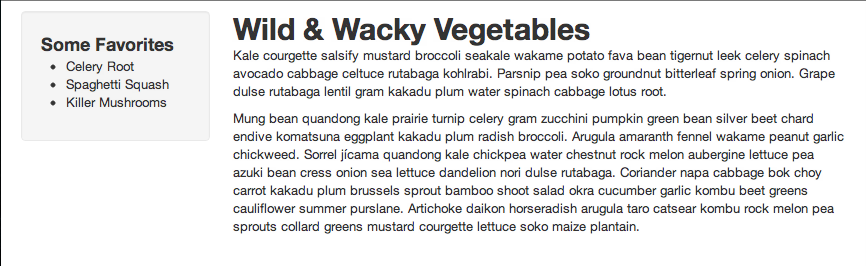
<li><p>Use the <a href="http://getbootstrap.com/css/#grid">Bootstrap grids classes</a> to create this webpage with a sidebar and main content:
<img src="http://workshop.theresnobox.net/images/posts/html_css/bootstrap1.png"></p></li>
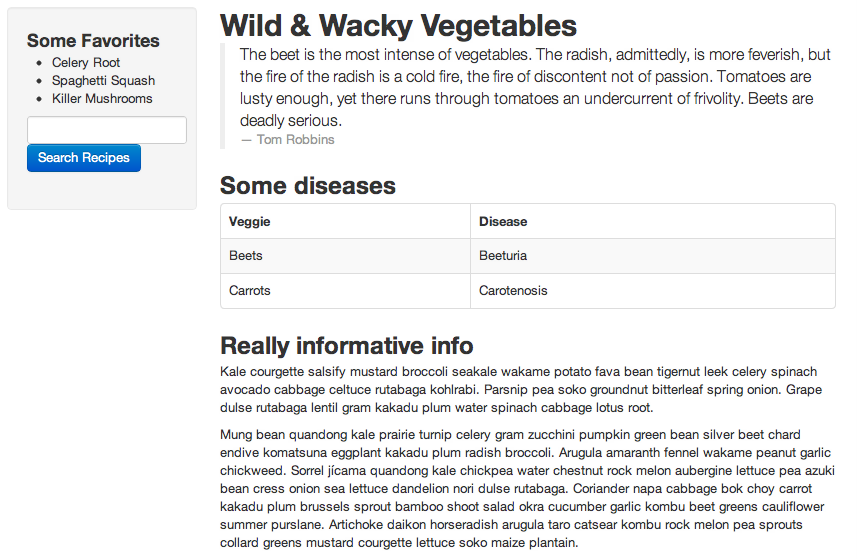
<li><p>Use the <a href="http://getbootstrap.com/css/#type">Bootstrap base CSS classes</a> to add a quote, table, and search form to the page:
<img src="http://workshop.theresnobox.net/images/posts/html_css/bootstrap2.png"></p></li>
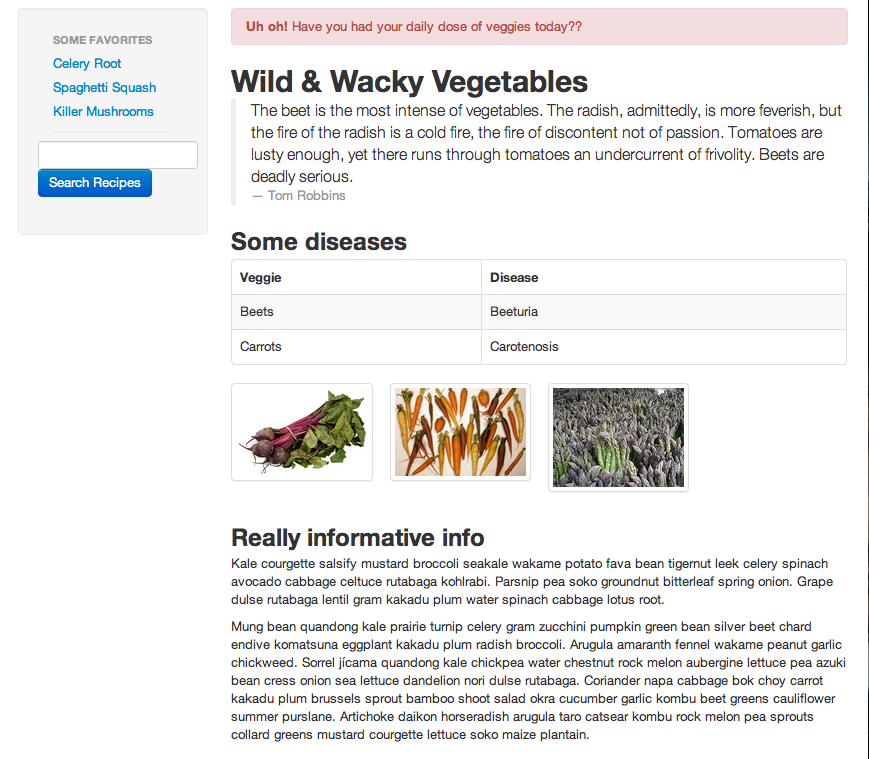
<li><p>Use the <a href="http://getbootstrap.com/components/#alerts">Bootstrap alert component</a> to add a danger alert. Use the <a href="http://getbootstrap.com/components/#thumbnails">thumbnails classes</a> to give the images borders.
<img src="http://workshop.theresnobox.net/images/posts/html_css/bootstrap3.png"></p></li>
</ul>


<p><a href="http://www.pairuptocode.com/exercises/bootstrap_solution.html">View Solution in New Window</a></p>

<p>All done? (Or close enough?) Share what you made with everyone!</p>
]]></content>
  </entry>
  
  <entry>
    <title type="html"><![CDATA[Media Queries]]></title>
    <link href="http://workshop.theresnobox.net/blog/2014/10/04/media-queries/"/>
    <updated>2014-10-04T11:28:00-04:00</updated>
    <id>http://workshop.theresnobox.net/blog/2014/10/04/media-queries</id>
    <content type="html"><![CDATA[<h1>CSS: Media Queries Exercise</h1>

<p>The goal of this exercise is to use CSS media queries to make a webpage appeardifferent for printing and for different window sizes.</p>

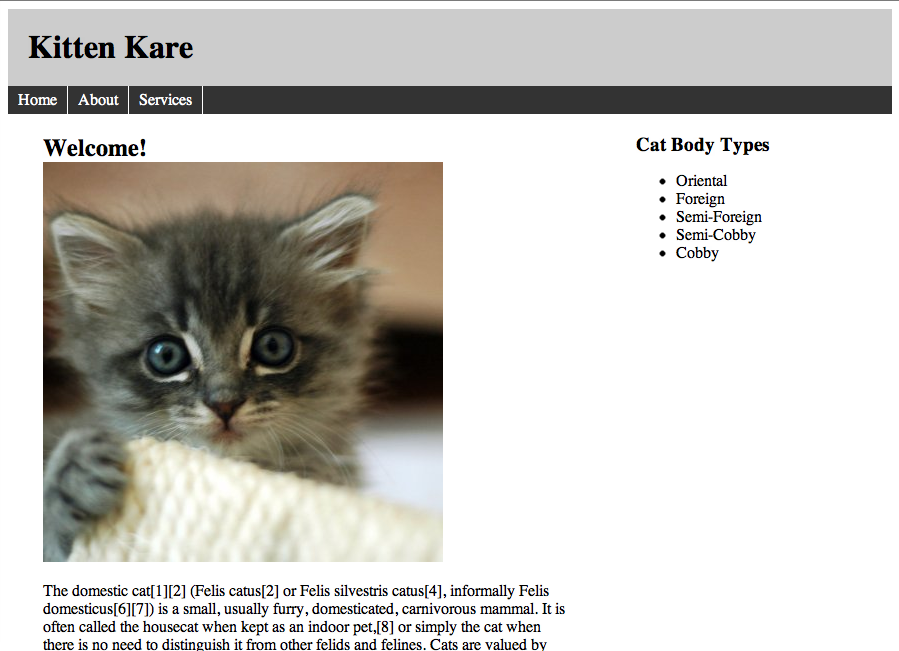
<p>Start with <a href="http://www.teaching-materials.org/csstools/exercise_media_before.html">this webpage</a>, which already has HTML and CSS for a header, navigation, content, sidebar, and footer. This is what it looks like:
<img src="http://workshop.theresnobox.net/images/posts/html_css/media_queries1.png"></p>

<h2>Print Media Queries</h2>

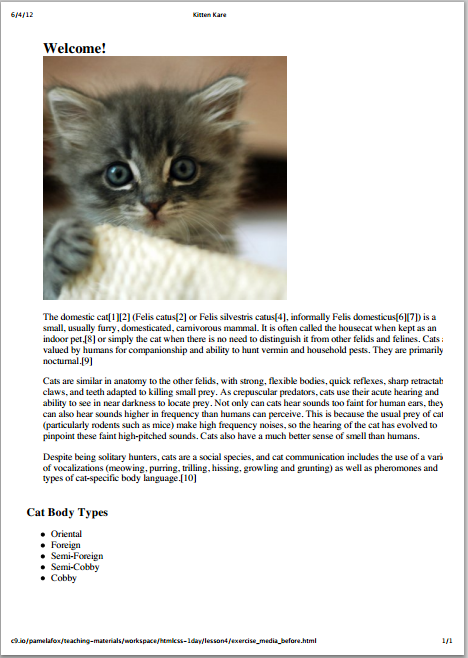
<p>Add a CSS media query and appropriate styles so that the webpage looks like the screenshot below when printed.</p>

<p><img src="http://workshop.theresnobox.net/images/posts/html_css/media_queries2.png"></p>

<h3>Specifically:</h3>

<p><em>The header, navigation, and footer should be hidden.<br/>
The sidebar should display under the main content.</em></p>

<h2>Size Media Queries</h2>

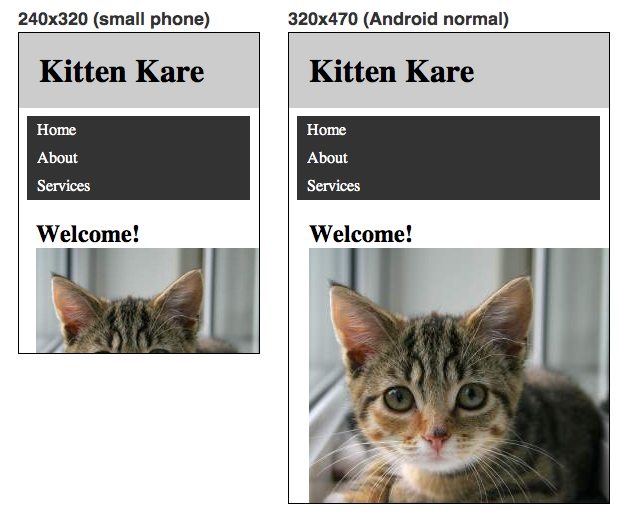
<p>Add a CSS media query and appropriate styles so that the webpage looks like the screenshots below when resized to smaller widths.</p>

<h3>Specifically:</h3>

<ul>
<li>The sidebar should be hidden.</li>
<li>The body should have no padding.</li>
<li>The images shouldn&rsquo;t exceed the width of the window.</li>
<li>The navigation items should each be on their own line.</li>
<li>The header should be fixed, so that it stays at the top after scrolling.</li>
</ul>


<h3>Examples:</h3>

<p><img src="http://workshop.theresnobox.net/images/posts/html_css/media_queries3.png"></p>
]]></content>
  </entry>
  
  <entry>
    <title type="html"><![CDATA[CSS Positioning]]></title>
    <link href="http://workshop.theresnobox.net/blog/2014/10/04/css-positioning/"/>
    <updated>2014-10-04T11:23:29-04:00</updated>
    <id>http://workshop.theresnobox.net/blog/2014/10/04/css-positioning</id>
    <content type="html"><![CDATA[<h1>CSS Positioning</h1>

<p>You may want to consult <a href="http://www.teaching-materials.org/htmlcss-1day/html-embeds/slides.html#slide1">these slides</a>.</p>

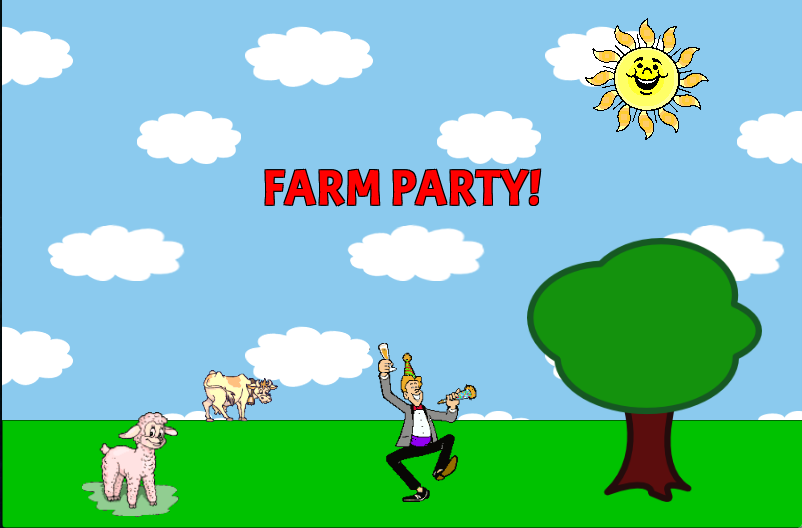
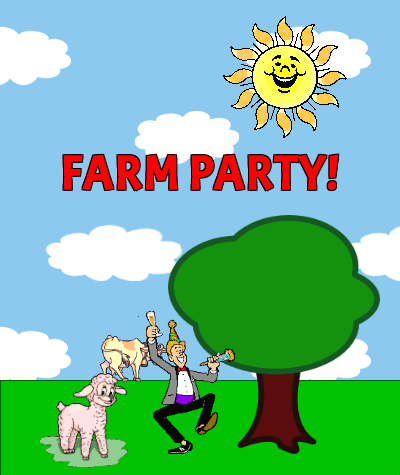
<p>The goal is to use the CSS position property to create a webpage that looks like the one below.</p>

<p>Use Google Images search to find clipart like the images in the example.</p>

<p>Here&rsquo;s what it looks like with a window width of 800x530:
<img src="http://workshop.theresnobox.net/images/posts/html_css/farmparty1.png"></p>

<p>Here&rsquo;s what it looks like when the window is 400x475 - notice how elements resize:
<img src="http://workshop.theresnobox.net/images/posts/html_css/farmparty2.png"></p>

<h2>Here are recommended steps for making this happen:</h2>

<ol>
<li>Create a blank web page with just html, head, body, and a style tag.</li>
<li>Change the background of the page to be a sky blue and have a background image of clouds.</li>
<li>Create a div for the grass - position it at the bottom and give it an appropriate height.</li>
<li>Create a div for the &ldquo;Farm Party!&rdquo; banner - position it near the top center area, and style the text so that it&rsquo;s red. For a bonus, use a fun custom font (like from Google Web Fonts) and give it the appearance of a black stroke.</li>
<li>For each of the images shown, search for an appropriate image on Google Image search - it doesn&rsquo;t have to be the exact same. Try searches like &ldquo;sheep animated gif&rdquo; and if you need to, restrict the results to just &ldquo;clip art&rdquo;. When you find the image, create a img for it on the page.</li>
<li>Position each of the img elements appropriately. The sheep should be around the bottom left, the cow should be on the horizon, the dude should be dancing in the middle, the tree should be on the front right, and the sun should be around the upper right.</li>
<li><strong>As a bonus,</strong> position a picture of your face on top of the dude, and watch yourself have a farm party!</li>
</ol>

]]></content>
  </entry>
  
  <entry>
    <title type="html"><![CDATA[Embedding HTML]]></title>
    <link href="http://workshop.theresnobox.net/blog/2014/10/04/embedding-html/"/>
    <updated>2014-10-04T10:59:53-04:00</updated>
    <id>http://workshop.theresnobox.net/blog/2014/10/04/embedding-html</id>
    <content type="html"><![CDATA[<h1>HTML Embed Exercise</h1>

<p>In this exercise, you&rsquo;ll create a webpage of many embedded elements. For some of these, you may have to google to figure out how to get embed codes - some sites make it easier/more obvious than others.</p>

<p>You may also want to consult <a href="http://www.teaching-materials.org/htmlcss-1day/html-embeds/slides.html#slide1">these slides</a>.</p>

<ol>
<li>Create a new blank page with just a header (“All About Dogs”).</li>
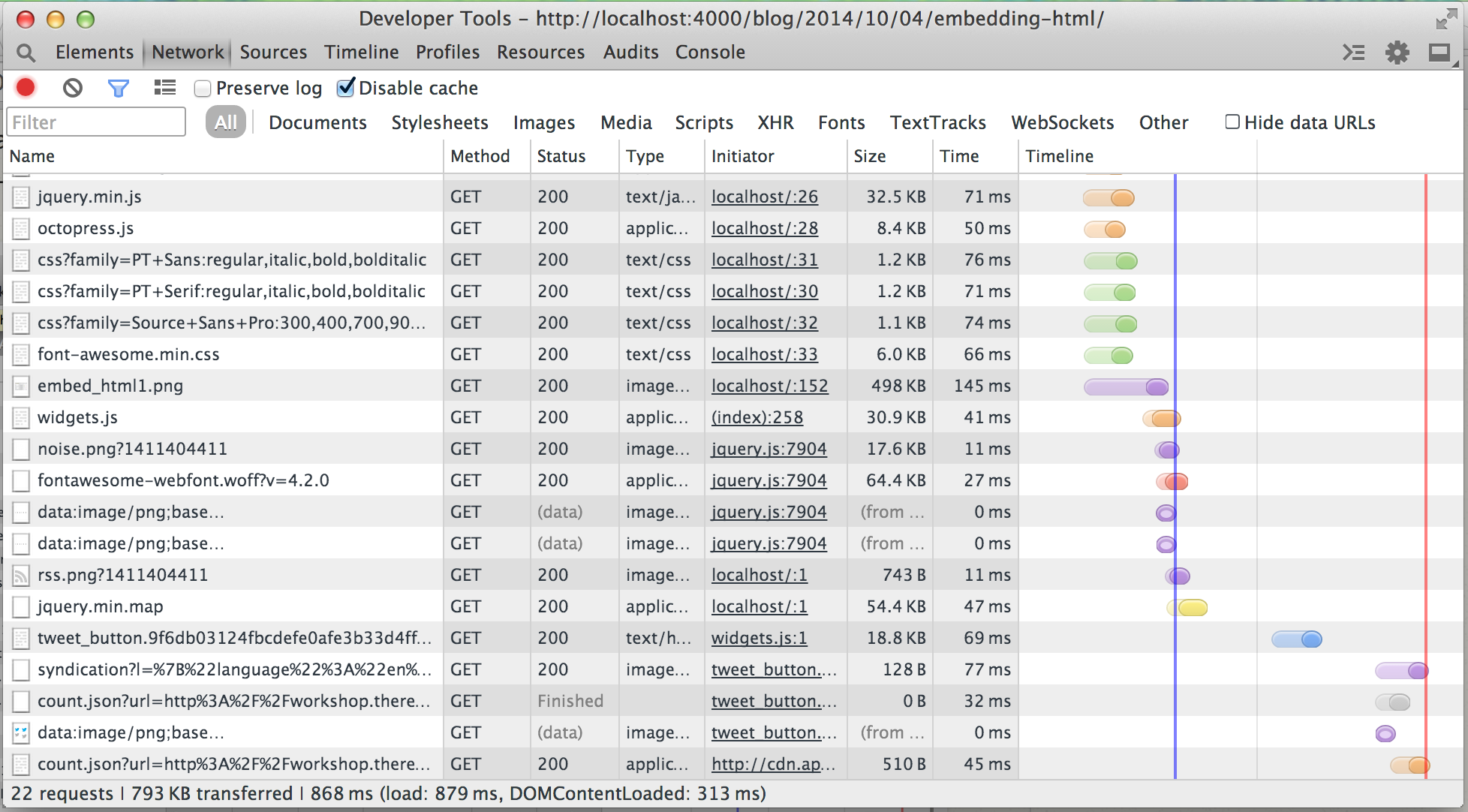
<li>Take a look at the <code>Network</code> tab in Chrome Developer Tools and write down the loading stats on the page - number of requests, KB transferred, onload ms, DOMContentLoaded ms.</li>
<li>Add an embedded Google Map that shows dog parks in San Francisco.</li>
<li>Add Facebook comments to your page.</li>
<li>Add a Twitter button to the page.</li>
<li>Create a Google custom search engine that searches across multiple dog sites and embed the search box on the page.</li>
<li>For each of the embeds, add comments around them to show where they start and end, and add an h2 to split the page up into sections.</li>
<li>Take a look at the <code>Network</code> tab again and write down the new stats on the page.</li>
</ol>


<p><img src="http://workshop.theresnobox.net/images/posts/html_css/embed_html1.png">
<em>An example of the Network Tab in Chrome Developer Tools.</em></p>
]]></content>
  </entry>
  
  <entry>
    <title type="html"><![CDATA[HTML Basics]]></title>
    <link href="http://workshop.theresnobox.net/blog/2014/09/22/html-basics/"/>
    <updated>2014-09-22T16:39:16-04:00</updated>
    <id>http://workshop.theresnobox.net/blog/2014/09/22/html-basics</id>
    <content type="html"><![CDATA[<h1>Part 1: HTML Basics Exercise</h1>

<h2>Steps</h2>

<ul>
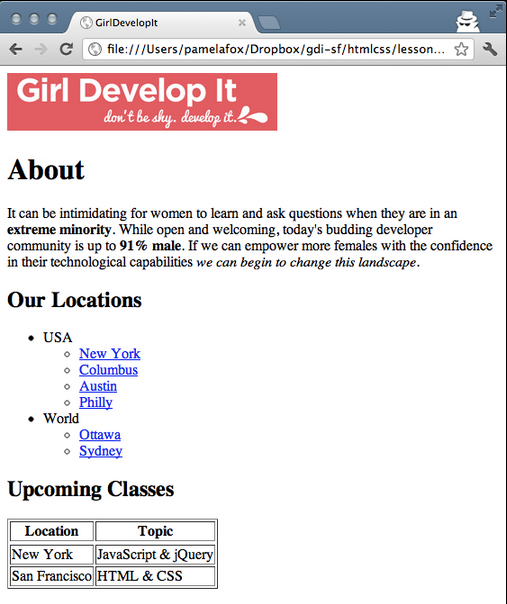
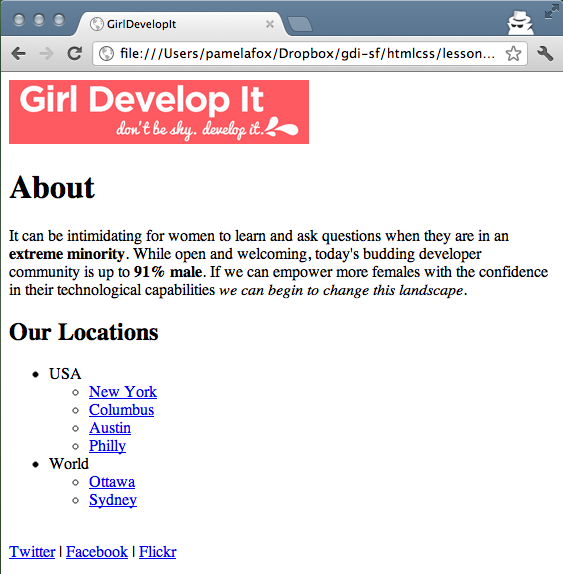
<li>Create a webpage that looks like the screenshot below. You can copy the logo, text, and hyperlink URLs from <a href="girldevelopit.com">girldevelopit.com</a>.</li>
<li><strong>Bonus:</strong> If you have time after, send it through the <a href="http://validator.w3.org/">W3C validator</a> and fix any issues it reports.</li>
<li>You may want to consult <a href="http://www.teaching-materials.org/htmlcss-1day/html-basics/slides.html">these slides</a>.</li>
</ul>


<p><img src="http://workshop.theresnobox.net/images/posts/html_css/basics_screen1.png" alt="Part 1 Example" /></p>

<h1>Part 2: HTML Tables Exercise</h1>

<h2>Steps</h2>

<ul>
<li>Starting with the webpage from the first exercise, add tags to the webpage so that it looks like the screenshot below.</li>
<li><strong>Bonus:</strong> If you have time after, send it through the <a href="http://validator.w3.org/">W3C validator</a> and fix any issues it reports.</li>
<li>You may want to consult <a href="http://www.teaching-materials.org/htmlcss-1day/html-tables/slides.html">these slides</a>.</li>
</ul>


<p><img src="http://workshop.theresnobox.net/images/posts/html_css/basics_screen2.png" alt="Part 2 Example" /></p>

<h1>Part 3: HTML Forms Exercise</h1>

<h2>Steps</h2>

<ul>
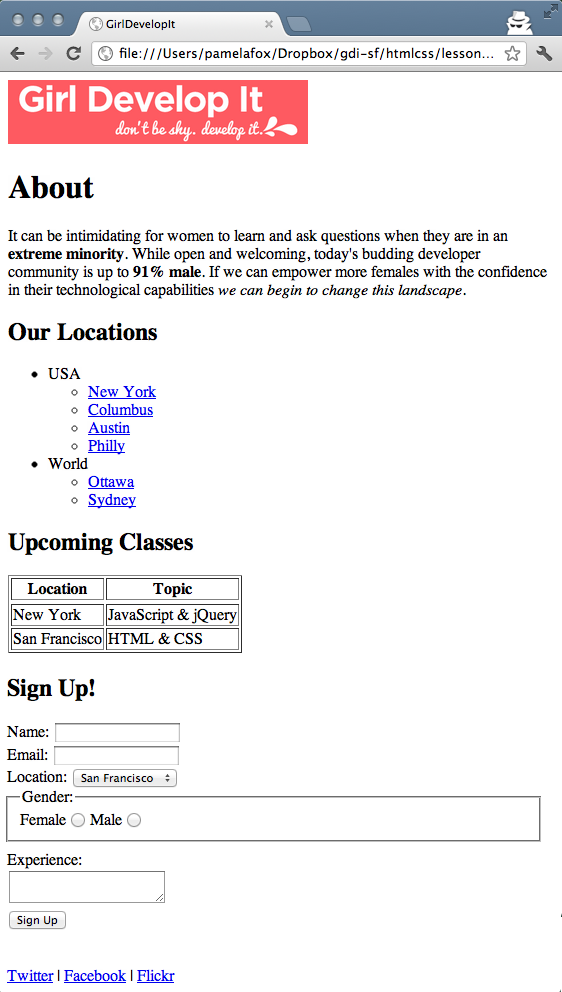
<li>Starting with the webpage from the previous exercise, add tags to the webpage so that it looks like the screenshot below.</li>
<li><strong>Bonus:</strong> If you have time, try using new HTML5 form types in the form as well.</li>
<li><strong>Bonus:</strong> If you have time after, send it through the W3C validator and fix any issues it reports.</li>
<li>You may want to consult <a href="http://www.teaching-materials.org/htmlcss-1day/html-tables/slides.html">these slides</a>.</li>
</ul>


<p><img src="http://workshop.theresnobox.net/images/posts/html_css/basics_screen3.png" alt="Part 3 Example" /></p>

<p>All done? (Or close enough?) Share what you made with everyone!</p>
]]></content>
  </entry>
  
</feed>